RealScore.
RealScore supplies the data
A NEW CITY. A PLACE TO CALL HOME.

Find your next home

Your home. Its costs. One clear score.

Start with a street number and name. Add a city to narrow the suggestions.

A home for you to live in · Houses · Condos · Townhouses · Manufactured homes
You’re viewing an illustrative example. Enter an address and RealScore fills in available home details automatically.
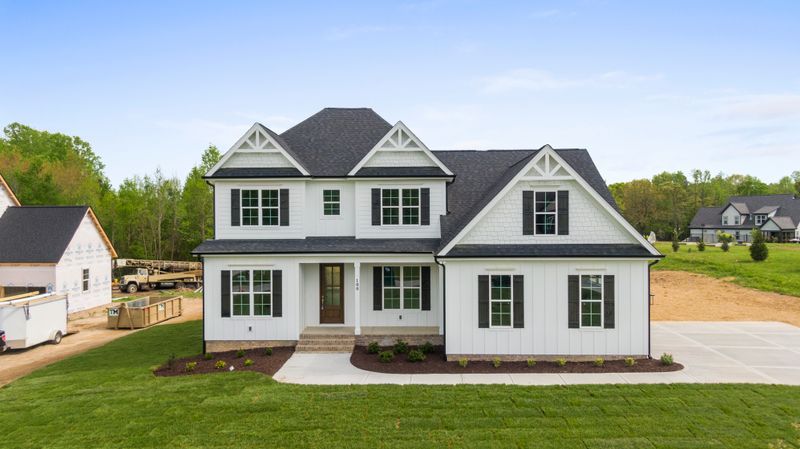
White house illustrating the example homeEXAMPLE HOME
Single-family home

1842 Willowbrook Lane

Illustrative US home
3 beds · 2 baths · 1,840 sq ft

Illustrative home details

Purchase price$325,000

RealScore Homebuyer Score

Planning estimate
—out of 100

A clear view of costs, repairs and what needs checking.

See why it scored this way ↓
Estimated cost of living here—/ month · mortgage, home bills, utilities & repair savings
See monthly costs →
Cash at closing—Down payment + estimated closing costs
Renovation budget—Repairs + extra for unexpected work
Cash to plan for—Buying, repairs, moving and emergency cash
School districtNot verifiedDistrict boundary; individual schools not verified

Why this score

See the costs, school data and area information behind every point.

NO HIDDEN FORMULA

Schools & reported crime

Sourced area information, with dates and clear comparisons.

SEARCH A HOME

School district performance

Always 10% of score

Reported crime — area statistics

Always 10% of score

Schools and reported crime each keep a fixed 10% weight. Unavailable information leaves points pending; no category gains their weight.

Purchase & closing costs

Buying the home. Renovation costs are separate below.

Purchase price—
Down payment—
Closing costs—

Renovation costs

Planning allowance · inspection needed

SEPARATE FROM THE PURCHASE

Choose your renovation budget

Use a renovation level or enter your own amount. Photos are optional for these planning choices.

Light: cosmetic updates. Moderate: broader updates to rooms and finishes. High: extensive renovation. Without a supported photo estimate, Moderate is the starting planning scenario: $50 per reported square foot, 20% extra for unexpected work and 3 months. You can choose another level or enter a Custom budget. These scenarios do not assess the home’s actual condition; an inspection and contractor quotes can refine the amount.

Renovation budget—
Extra for unexpected work—
Total renovation budget—

Get to know your new area

Your everyday life matters as much as the purchase price.

School district context

Not verified

Individual school assignment: not verified. District boundaries and nearby schools do not confirm enrollment. Use the district’s current address lookup or contact its enrollment office. Assignments can differ by grade and school year.

Explore daily life nearby

Map links open Google Maps for this address. Nearby places and travel times are checked there; RealScore does not rate neighborhood quality.

Plan your commute

Compare your everyday route or plan a longer trip without leaving RealScore.

Starting from your homeSearch a home to choose your starting point.

Explore a home above, then enter your destination to see the route here.

Showing a route shares the home address and your destination with Google Maps. Your destination stays in this browser until you show the route. Available journeys and times come from Google.

What to check before you commit

YOUR HOME, YOUR DECISION
Make the numbers yours Optional edits · your budget updates instantly

Available home facts are filled in automatically. Personal budgets start with labeled planning assumptions.

CLEAR COSTS. NO GUESSWORK DISGUISED AS FACT.

How your score & budget work

What goes into your Homebuyer Score?

The same weights apply to every home: renovation burden 28%, property taxes, insurance and HOA 20%, mortgage size and interest cost 16%, confidence in reported facts 16%, school district performance 10%, and reported crime 10%. Together they total 100%.

Single-family homes with no reported HOA fee display N/A and start with $0 in the budget. That planning assumption earns the HOA category’s 3 points; it does not confirm the home is outside an HOA. Reported fees and your edits are used when available. Unknown fees for condos, townhouses and other property types keep only their 3 HOA points pending. You can confirm no HOA or enter the actual fee in the optional budget edits.

Repair costs include extra for unexpected work, on top of the purchase price. Lower repair budgets earn more renovation points, and higher budgets earn fewer, with no repair-related ceiling on the overall score. Zero repair costs earn all renovation points; a total repair budget of 15% of the purchase price earns half. Points continue falling as costs rise. This is RealScore’s scoring preference, not a contractor estimate. Renovations contribute up to 28 of the 100 points, so the other factors still matter. Property bills always use 20 points: taxes 12, insurance 5 and HOA 3. Unknown HOA for other property types leaves only its 3 points pending; available taxes and insurance still count. A single-family N/A planning amount retains the full 3 HOA points. Lower annual costs relative to the price earn more points, scored separately: taxes earn full points at 0.6% of price and zero at 3%; insurance at 0.25% and 1.25%; HOA at 0.15% and 0.75%. Between those amounts, points fall evenly. These are RealScore planning preferences, not market averages. Insurance uses the labeled budget until you enter a quote. Unconfirmed tax stays pending. A single-family home with no reported HOA fee uses a labeled $0 planning assumption; that adds no points for confidence in reported facts. Half of the mortgage points rise with the selected down payment, reaching full points at 20%. The other half use annualized interest at the starting loan balance relative to price: full points at 3%, zero at 8%. These are not actual first-year interest or total mortgage payments; loan term and mortgage insurance remain in the monthly budget.

Fact points: asking price 4.8 (estimated value or your scenario 2.4), bedrooms 2.4, bathrooms 2.4, floor area 2.4, recorded tax 2.4 (your amount 0.8), reported HOA 1.6 (your amount 0.8). Single-source home details receive two-thirds of their points; conflicting or missing details receive none. These are RealScore screening preferences, not lender or market standards.

Real-home scores remain preliminary until repair costs are checked with an inspection and contractor quotes. Repairs affect the renovation points directly; they do not impose a 74- or 49-point ceiling. Conflicting facts or a whole-building sale still limit the score to 59. A score is unavailable when purchase price, taxes or insurance amounts are missing. Unknown HOA for other property types does not prevent a provisional score; the full monthly budget remains pending and known monthly costs stay visible. Single-family N/A uses $0 in the budget. Without a supported photo estimate, the default Moderate renovation scenario uses $50 per reported square foot, 20% extra and 3 months. It is a planning scenario, not a condition assessment. If floor area is unavailable and no custom or photo-based repair amount is supported, renovation points remain pending. Choosing No repair budget yet also leaves the fixed 28 repair points pending. The headline score is rounded to a whole number, so small budget changes may not change the displayed number.

The score screens cost and planning risks. It does not prove affordability, funds available, a good market price or move-in readiness. School district performance and comparable citywide crime always keep 10% each. The four other categories always total 80%. Unassessed repair needs and unavailable bill, school or crime information are marked pending, without changing any category weight. The provisional range adds between zero and the category’s full possible points to the known result; it is a possible model score range, not an estimate of missing repair costs, school ratings or crime rates. Limits for conflicting facts or unclear sale scope are applied after combining the factors. An unavailable area factor is different from a verified factor that earns zero points.

When a supported photo review is available, the renovation estimate is a visible-work cost range. Photos remain on the server and are not shown here. The lower score endpoint uses the higher repair cost; the upper score endpoint uses the lower repair cost, together with any pending categories. Cash totals use the upper repair-budget endpoint plus the separate unexpected-work allowance. Photos cannot confirm hidden wiring, plumbing, structure, roof leaks, permits or complete repair needs. An inspection and contractor quotes still need to establish the full scope. If usable photos, sufficient room coverage or the photo-review connection are unavailable, the default Moderate planning scenario remains available. Automatic photo estimates can replace that default when supported; your selected levels and custom repair edits stay in place. No floor area is guessed when the record is missing.

The monthly budget adds mortgage principal and interest, property tax, home insurance, mortgage insurance when modeled, HOA fees, utilities and money for future repairs. Mortgage principal and repair savings are cash outflows, so this is a budget rather than a list of expenses.

Cash to plan for adds your down payment, estimated closing costs, renovation and contingency, moving and temporary housing budgets, and emergency cash kept available. The purchase price is not added again to the down payment. Renovations are cash-funded; no automatic increase in the home’s value is assumed.

Loan terms and the 1% yearly upkeep allowance, $250 monthly utilities and $2,000 moving budget are editable RealScore planning assumptions. These are not lender or service quotes. For a modeled conventional loan with less than 20% down, a 0.6% yearly loan-balance allowance is used for mortgage insurance unless you enter a quote. Other loan programs and upfront loan fees need a lender’s estimate.

Scores use the district containing the property’s coordinates, never the closest school. District boundaries do not establish individual school assignment or enrollment. Verify the assigned school with the district for the relevant grade and school year. Illinois district comparisons use the same-type state percentile of average reading and math proficiency; the rank is calculated by RealScore. Connecticut uses the published accountability index where verified. Verified performance reports currently cover Connecticut and Illinois. Other states can have district boundary matches while their performance points remain pending. State rating systems differ.

City crime rates are reported offenses per 100,000 residents compared with same-year FBI national estimates. The crime index averages 100 ÷ (1 + city rate ÷ national rate) for violent and property crime: a benchmark match scores 50. These are citywide reported data, not a prediction of crime or personal safety at a home. RealScore does not produce an affordability verdict without your household budget.

CFPB: planning the full cost of a home